DakPro
Week 1
Whisper
Went through the paper on Whisper - speech recognition model from OpenAI.
It’s open source and available on GitHub.
Many models are available to choose from:
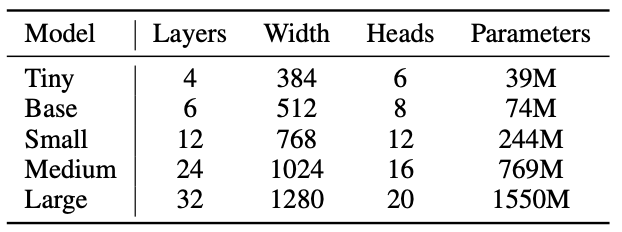 Choice of model:
- By taking into account other processes running on the device -- better for deployment
- Customizable by user?
There can be some custom vocabulary/promting added to the model – interesting what it can be achieved with it.
Training dataset is 2/3 english and 1/3 uneven mix, but model’s “knowledge” is transferable across the languages (for instance slavic languages parts enhance each other).
Installed both whisper and whisper.cpp on Mac
Ran transcription with whisper
Ran transcription with whisper.cpp
sox -d \<filename\>
nice tool to record audio
-d stands for default input device
rPi
Tried to set up the rPI. The system didn’t boot. Turns out it’s the problem with the rPi itself - it didn’t read from the SD card (indication of no reading: no green LED blinking, only red).
Got new board - gives green light
new rPi
Booting rPi with 64-bit standart (not headless) OS. for production and further testing - headless (Lite) version should be tested as it’s smaller and faster than the standart OS.
Connecting Mac to the rPi ssh via ethernet via switch
! don’t forget about setting host when writing OS to the SD-card
just figured out you can update bootloader with the same sd - just different stuff needs to be loaded on it. Could I fix the “broken” rPi by updating the boot? (to be done)
- connect both rPi and Mac to an ethernet switch (NetGear GS108 in my case) Had problem with detecting connection from rPi to the switch.
- When using ethernet on Mac, one should add the ethernet as service. (Done in *Settings/Network*)
- To make the connection work, one should make static IP addresses on the connection for both Mac and rPi
For Mac:
- goto Settings/Network/Apple Adapter(or how else you named the service) -> Details -> TCP/IP tab
- change configure ipv4 to manual
- Input the static address (I chose 192.168.5.1)
- Subnet mask is left 255.255.0.0, other empty fields are left empty
For standart rPi setup:
- Click on the double-arrow network symbol in the top right corner
- Advanced Options/Edit Connections/Wired Connection X/IPv4 Settings/ note: previously set Link negotiation on Wired Connection X/Ethernet to Automatic - what has it fixed?? also set cloned MAC address to Permanent - not sure I completely understand what it does
- Set *Method* to *Manual*
- *Add*
- Set parameters (192.168.5.2, 24, 192.168.5.1 for me (not sure what 24 does))
- Save
- Reboot the rPi
For headless rPi setup:TODO
Finally, we got the working rPi-Mac connection
To verify: turn off wifi and try
ping raspberrypi.local
Or even try to login (on my rPi I made user = “user”):
ssh user@raspberrypi.local
Also ensure in .ssh/known_hosts there’s no entry for raspberrypi.local, as there exists a with such URL, thus when you try to connect to ssh for the first time the website is accessed.
Connecting rPi to eduroam via wlan
needs to be done via loading configuration as /etc/wpa_supplicant/wpa_supplicant.conf:
network={
ssid="eduroam"
key_mgmt=WPA-EAP
eap=PEAP
identity=""
password=""
phase1="peaplabel=0"
phase2="auth=MSCHAPV2"
ca_cert=""
priority=1
}
</code></pre>
restarting the service:
sudo killall wpa_supplicant
sudo wpa_supplicant -B -i wlan0 -c /etc/wpa_supplicant/wpa_supplicant.conf
sudo dhclient wlan0
check by
iwgetid
ping 1.1.1.1
### Ran whisper.cpp on rPi
----
Took ~18s to transcribe 11s audio.
Lite OS optimization wouldn't be that effective + other processes are to be run in the background.
Before thinking on optimization decided to run kyutai, as if kyutai is 5 times faster, optimization efforts are wasted.
## Kyutai
----
Alternative model: kyutai
* Smaller, better performance than whisper
* Inputs stream instead of recording, thus much better for live transcription
* Only English and French
Trying to run kyutai model on rPi
- Clone repo from git
- Install rust
- cd stt-rs
- sudo apt install libssl-dev
- export PKG_CONFIG_PATH=/usr/lib/aarch64-linux-gnu/pkgconfig
- cargo run -r ../audio/bria.mp3
takes a long to build - haven't tried with uv though
github guide also includes "--features cuda" in the last stage, but as there's no gpu on rPi, it's been removed
Problem: kyutai is too big and thus cannot fit into 3.3 RAM -> the process gets killed
sudo install python-msgpack